Notifications, woven into calm
The notifications you cleared are still here to read.
Your phone lights up all day and most of it is gone the moment you swipe. NotiWeave saves every alert in a chat-style thread per sender, so a notification you cleared, or a message deleted after it arrived, is still there when you go looking. Each sender can have their own sound, too.
Free · Built for Android · reads only the apps you choose
What it does
Nothing you were sent goes missing.
NotiWeave reads notifications only for the apps you choose, sorts them by who they’re from, and hands you the controls, down to which apps reach your notification tray at all. No noise, no clutter, and your messages stay on your phone.
A notification saver, not a 24-hour log
Every notification NotiWeave captures is saved on your device, so an alert you swipe away is still there to read. Search inside any thread and narrow it to today, the last week or month, or a date range you pick. Nothing expires on a timer the way Android’s own notification history does.
A sound for every message
Give any sender, or a whole app, its own notification tone. Choose from a Catalog of two dozen built-in tones, borrow one your phone already has, or import your own file. Previewing each before you commit.
One thread per sender
Each app’s notifications are grouped into a chat-style thread per sender, so a conversation with Mum reads as one tidy thread you can scroll, not a pile of separate banners. Group chats keep the group’s name, with each message labelled by who sent it, and photos or shared Instagram reels land right inside the thread (when Instagram includes the link, a tap opens the reel there; otherwise the preview opens in NotiWeave). WhatsApp voice notes play right in the thread, and with your permission the original photos, videos and documents are kept too, so they stay even if the sender deletes them. A message deleted for everyone stays readable, marked as deleted by the sender.
One tray instead of twenty
Turn on Group in one tray and NotiWeave collects your alerts into a single quiet entry in your notification tray. The full list lives in the app’s Notifications panel, newest first, unread marked, swipe one aside to clear it. Nothing is lost to a reboot.
Block the apps that won’t stop
Block an app and its notifications are cleared out of your notification tray as they land, silently, or with a tone of your choosing so you still know something arrived. Every blocked alert is still logged in the panel, so it’s a filter, not a black hole.
A ringtone for every call
For calling apps like WhatsApp and Instagram, NotiWeave loops a ringtone of your choice for incoming calls, a distinct one per caller if you want, so you know who’s ringing without looking.
Private by default
No server of ours, no account, and nothing watching what you do. Your notifications sit in private storage on your phone that other apps can’t open, and nothing is uploaded to us, there is no NotiWeave server for it to go to.
You choose what each app does
Per app, decide what NotiWeave captures: save its messages as threads, play your own notification sounds, or ring a custom tone for its calls. Any combination, changed whenever you like. Need finer control? Write a rule: any notification whose title contains, equals or matches a pattern gets its own tone, one Slack channel, one Gmail sender.
On your computer too
Your phone’s notifications, on your computer.
NotiWeave for PC is a free browser extension for Chrome and Edge. Turn on Connect to PC in the app, scan one QR code, and your notifications reach your computer straight over your Wi-Fi, end-to-end encrypted.
- Desktop notifications as they land on your phone, with recent ones in the toolbar, filtered by app.
- One-click codes: a one-time code arrives with a Copy code button.
- Clipboard sync, both ways: copy on one, paste on the other.
- No server, no account: phone and computer talk directly over your Wi-Fi.
How it works
Set it up once. It saves everything after that.
Three quick steps: NotiWeave does the weaving from then on.
Turn on notification access
Flip on Android’s Notification Access so NotiWeave can see your alerts, then allow it to keep running in the background so nothing’s missed while your phone is idle. You can turn it off again whenever you like.
Pick your apps
Your chat apps come pre-ticked, so one tap saves WhatsApp, Instagram and the rest. Later, in Apps, add more or choose what each does: save as threads, custom message sounds, call ringtones. Anything you’d rather not see at all goes in Block. Everything else stays invisible to NotiWeave.
Weave & assign sounds
Watch your alerts flow into tidy per-sender threads. Set a default sound per app, a signature tone or call ringtone per sender, or fine-tune with rules. Switch on Group in one tray and your notification tray goes quiet too.
See it in action
Your notification history, sorted by sender.
The real flow, screen by screen, from first launch, into a sender’s woven thread, through the panel that holds everything lifted out of your notification tray, to the controls that decide what each app may do and what it sounds like.
Illustrative previews: names and messages are examples.
Real screens
The app as it is.
Thirty seconds of the real thing, then the screens themselves, captured from a phone, not drawn.
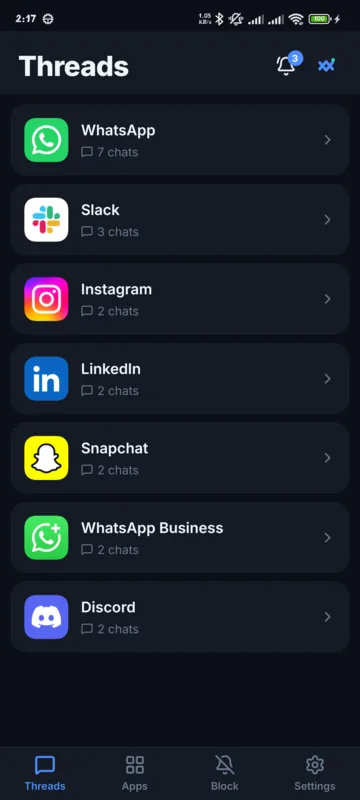
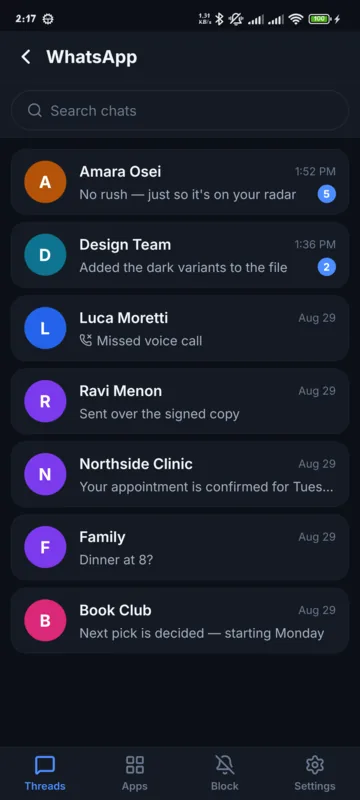
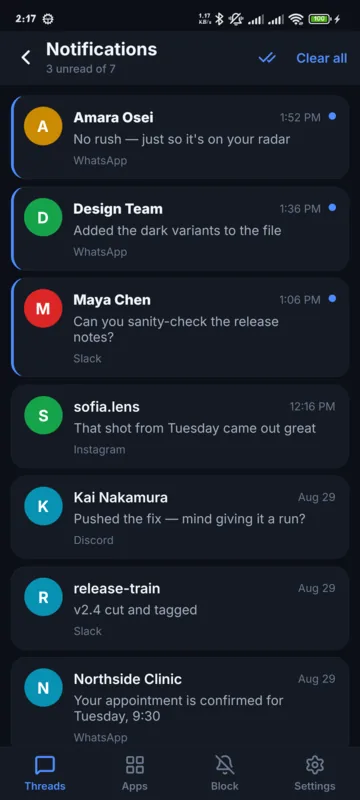
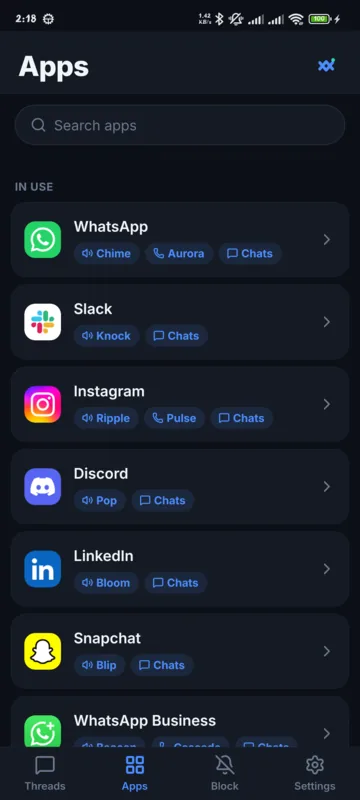
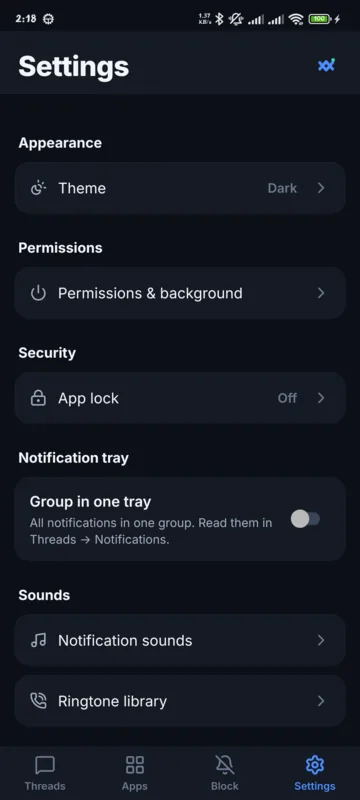
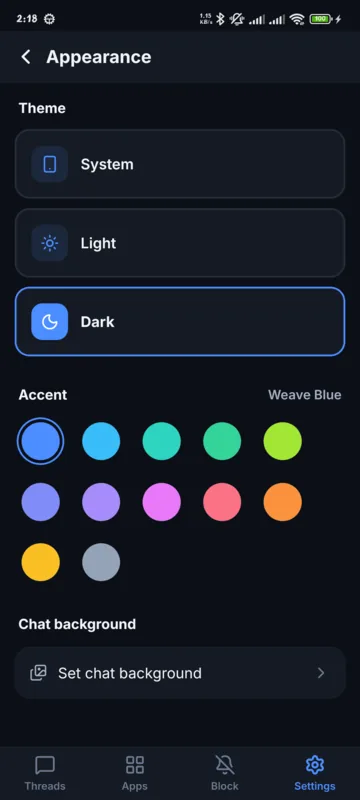
Captured on a phone with example chats: names and messages are invented.
Private by design
Your notifications stay on your phone.
NotiWeave has no server and no account, so there is nowhere for your notifications to be uploaded to. This version does not create backups either, nothing it captures leaves the phone at all. The one exception is Connect to PC: turn it on and your notifications go straight to your own computer over your Wi-Fi, end-to-end encrypted.
- Reads notifications only for the apps you enable: every other app is ignored.
- Kept in private storage on your phone that other apps can’t open. No cloud, no syncing, no backups you didn’t ask for.
- Nothing in the app tracks what you do or reports it back to us, and nothing NotiWeave captures is ever handed to anyone else.
- Clear everything in one tap, or uninstall to remove all stored data instantly.
Questions
Good to know.
Is NotiWeave free?
Yes: NotiWeave is free to download on Google Play, with no account and no sign-up. Saving notifications, one thread per sender, a sound per app and per sender, a ringtone per caller, the Group in one tray switch and a light or dark theme are all there from the first launch.
Do my notifications get sent anywhere?
Not to us, and not to anyone else. There’s no NotiWeave server and no account, everything it captures stays in private storage on your phone, and it is never sold or shared. This version has no backup feature, so nothing it captures leaves your phone at all. The one exception is Connect to PC: turn it on and your notifications go straight to your own computer over your Wi-Fi, end-to-end encrypted. See the privacy policy for the full detail.
Can I see my notifications on my computer?
Yes, with NotiWeave for PC, a free browser extension for Chrome and Edge on the Chrome Web Store. Turn on Connect to PC in the app, scan the QR code the extension shows, and your phone’s notifications pop up on your computer, sent straight over your Wi-Fi and end-to-end encrypted. Clipboard sync and one-click codes come with it. More about NotiWeave for PC.
Why does it need Notification Access?
Reading notifications from other apps requires Android’s Notification Access, it’s the only way Android lets one app read another app’s notifications. NotiWeave only ever reads notifications for the apps you explicitly enable.
Does it keep working in the background?
Yes, though Android sometimes puts background apps to sleep to save power. During setup NotiWeave asks you to let it keep running in the background and, on some phones (Xiaomi and Redmi, for example), to switch on Autostart, so it keeps weaving while your phone is idle or after a restart.
Which apps does it watch?
Only the ones you pick, in the Apps screen. Change the list whenever you like: every other app is ignored. Banking and finance apps, and Android’s own system apps, never appear in the list at all: their notifications are dropped on arrival and never stored.
Can I use my own sounds?
Yes. NotiWeave ships with two separate libraries: two dozen short notification tones and eight looping call ringtones. Each is split into Mine, a Catalog to add more from, and Phone, the tones already on your device. Import any audio file on top of that. Everything ships inside the app, so nothing is ever downloaded. Set a default per app, a different sound per sender, or write a rule. A tone for any notification whose title contains, equals or matches a pattern, so one Slack channel or one Gmail sender sounds different. Previewing each as you go.
Can it tidy up my notification tray too?
Yes: turn on Group in one tray in Settings. NotiWeave then collects the notifications it’s allowed to handle into a single quiet entry in your notification tray, and the full list lives in the app’s Notifications panel: newest first, unread marked, tap to open, swipe aside to clear. Because those entries are stored on your device they are still there after you restart your phone, which the tray’s own notifications are not. Banking and system notifications are never taken over, and the setting is off until you switch it on.
Can I stop an app from notifying me at all?
Yes. Add it to the Block tab and NotiWeave clears its notifications out of your tray as they arrive, Silent plays nothing, Sound still plays a tone so you know something came in. Nothing disappears for good: every blocked alert is still listed in the Notifications panel with a “Blocked” tag, so you can check what you missed.
Can it ring a custom tone for calls?
Yes. For calling apps like WhatsApp and Instagram, NotiWeave loops a ringtone of your choice for incoming calls, a distinct one per caller if you like, so you know who’s ringing before you look.
How do I delete my data?
Settings → Clear captured data wipes everything at once. Turning Notification Access off stops it saving anything new straight away, and uninstalling the app removes everything it stored.
From the blog
How to read notifications you already cleared.
What your phone already does on its own, and where NotiWeave picks up.
Ready to weave your notifications into calm?
Free, private, and built for Android. Get it on Google Play.

Have a question first? Get in touch.